 Vini Studio
The film is assembled: the scenes work and the sound is in place. What remains is deciding how to speak to the viewer over the picture. Do you need a quiet heading, an explanation of a detail or a large phrase at the right moment? Add all three at once and the graphics start competing with the image. Choose the design around its purpose, then check it on the moving film.
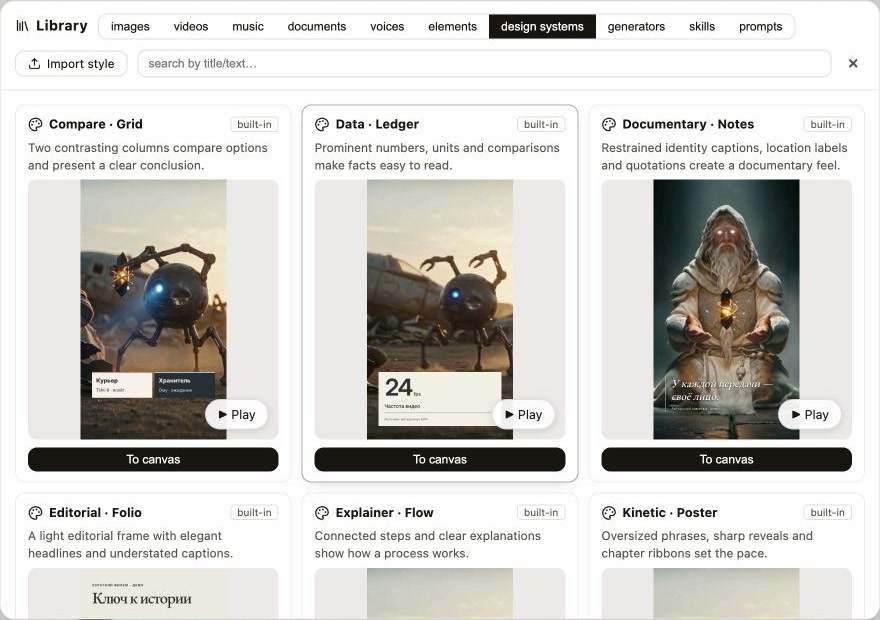
Vini Studio has ten built-in design systems for this. Each supplies its own fonts, composition, elements and motion. In the library, you can play an actual video demonstration alongside the description. We show them on the same material: the published thirty-second AI film The Key. Keeping the source identical makes it easier to see what the design itself changes. The original demonstrations use Russian titles and annotations.
Three directions for three purposes
Editorial · Folio
Editorial · Folio suits an image that needs breathing room and text that needs a quiet hierarchy. In the demonstration, the video becomes part of a magazine layout, with an episode title, labels and a styled quotation alongside it. Try this approach for an authored story or a piece whose images need time to be seen.
Signal · Detail
Signal · Detail helps explain where to look. A label, pointer and named characteristic draw attention to a particular detail during a chosen interval. It is a useful starting point for explaining a device, a product or an important object in a scene. The pointer is placed within the composition; this demonstration does not promise automatic tracking of a moving object.
Kinetic · Poster
Kinetic · Poster brings a short phrase to the foreground: large typography appears in stages, while a chapter ribbon marks a meaningful beat. Pauses matter especially here. A strong accent works better when the viewer has time to return their attention to the picture.
Try a design on your own material
Open design systems in the library, watch the examples and choose “To canvas” for a suitable entry. Connect the Design system node to Decoration, and your finished film to its video input. Add context when needed: exact wording, product facts or a request to keep an important part of the picture clear.
To review the result before exporting the final video, choose Plan + decoration studio. There you can correct text, move an element, change its width and adjust when it appears. Watch the whole episode: a neat opening title does not establish that a later label leaves faces, hands and action clear.
Review subtitles separately: were the words recognised correctly, does the line appear on time, and is it comfortable to read on a phone? You can correct the text and its timing before export.
Keep a good choice for the next episode
Decoration outputs the exact style used in its result. Pass it to the next episode through the Design system output, or save it to the library from the panel or Series design. In another project, add the saved entry to the canvas and connect it to the new Decoration node.
The components, fonts and motion travel with it. Words, positions and intervals are fitted to the new material, so the next episode still needs a review. This helps continue the visual language you chose; it does not guarantee an identical composition for every kind of shot.
Full guide: decoration, manual edits and saving a series style →
Create videos in Vini Studio
Ideas, characters, scenes, sound and editing in one project. Work independently or discuss content production with our team.
Get started in the studio →Sign in with Telegram or Google. No account needed in advance — it is created for you.